


Task automation is becoming a core part of modern business operations as organizations aim to improve efficiency, reduce manual effort, and make faster, data-driven decisions. By automating repetitive tasks and workflows, businesses can streamline processes, minimize errors, and free up valuable resources for strategic initiatives. Whether you’re handling data processing, reporting, or operational workflows, implementing task automation requires a structured and well-planned approach to ensure long-term success.
What Is Task Automation in a Data-Driven Business Environment?
Task automation refers to the use of technology to execute repetitive processes with minimal human intervention. In a data-driven environment, it plays a key role in managing large volumes of information efficiently.
It involves automating activities such as data collection, transformation, reporting, and workflow execution. These processes are essential for maintaining consistency and accuracy across systems.
Modern task automation integrates with data analytics platforms to support real-time insights and faster decision-making. This ensures that businesses can act on reliable data without delays.
When aligned with data consulting strategies, task automation becomes a foundation for scalable and intelligent business operations.
Why Do Businesses Need Task Automation for Better Decision-Making?
Organizations today deal with complex data ecosystems, making manual processes inefficient and error-prone. Task automation helps simplify these operations and ensures consistency.
It enables faster processing of data, allowing teams to generate insights without delays. This directly impacts the speed and quality of business decisions.
Automation also reduces dependency on manual intervention, minimizing the risk of human error in critical data workflows. This leads to more reliable outcomes. Ultimately, task automation supports a structured approach to data analytics, improving operational efficiency and strategic planning.
Key Benefits of Implementing Task Automation
- Reduces manual errors in data handling and reporting
- Improves efficiency in repetitive and time-consuming processes
- Enables faster data processing and real-time insights
- Enhances consistency across workflows and systems
- Supports scalable data operations as business grows
- Frees up resources for strategic and analytical tasks
- Strengthens overall data governance and compliance
How to Identify Tasks Suitable for Automation?
Identifying the right tasks for automation is key to improving efficiency and decision-making. Businesses should focus on processes that are repetitive, time-consuming, and driven by structured data.
Repetitive data tasks like data entry, validation, and transformation are ideal, as automation ensures consistency and reduces manual effort. Time-consuming reporting activities can also be automated to generate faster insights from multiple data sources.
Rule-based workflows are highly suitable since they follow fixed logic and do not require human judgment, improving speed and accuracy. Additionally, data integration processes benefit from automation by enabling seamless data flow and supporting better analytics across systems.
Building a Strong Foundation for Task Automation
Before implementing automation, it is important to establish a clear foundation. This includes understanding existing workflows, data sources, and business objectives. Organizations should assess their current data infrastructure and identify gaps that may impact automation. A well-defined structure ensures smoother implementation. Data quality and governance must also be prioritized to ensure accurate outcomes. Poor data can lead to ineffective automation results. A strong foundation helps align automation efforts with broader data strategy and business goals.
What Tools and Technologies Are Used in Task Automation?
Workflow Automation Platforms
Workflow automation platforms are used to design and execute automated workflows efficiently. They help businesses map processes, define triggers, and manage task sequences across systems. These platforms improve coordination between different tools and ensure that workflows run smoothly without manual intervention.
Data Integration Tools
Data integration tools connect multiple data sources and enable seamless data flow across platforms. They help in consolidating information from different systems, ensuring consistency and real-time availability of data. This supports accurate analytics and improves the overall efficiency of data-driven operations.
Robotic Process Automation (RPA)
Robotic Process Automation tools are designed to handle repetitive and rule-based tasks by mimicking human actions in digital systems. They are particularly useful for high-volume processes, reducing manual workload and increasing operational speed while maintaining accuracy.
Analytics and Monitoring Tools
Analytics and monitoring tools track the performance of automated workflows and provide insights into efficiency and errors. They help businesses identify bottlenecks, optimize processes, and ensure that automation systems continue to deliver reliable and consistent results.
Common Challenges in Task Automation Implementation
While task offers significant benefits, it also comes with challenges that need careful consideration. One common issue is poor data quality, which can impact automation accuracy.
Integration complexities between different systems can also create implementation hurdles. Without proper planning, workflows may not function as expected.
Resistance to change within teams is another challenge, as employees may need time to adapt to automated processes. Proper training and communication can help address this. Addressing these challenges proactively ensures smoother adoption and better outcomes from automation initiatives.
Conclusion
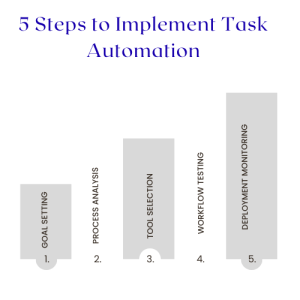
Task automation is a critical component of modern data-driven businesses, enabling organizations to streamline operations, improve accuracy, and make faster decisions. By identifying the right processes, using appropriate tools, and following a structured implementation approach, businesses can unlock significant efficiency gains.
However, successful implementation requires a strong data foundation, clear strategy, and continuous optimization. This is where the role of expert guidance becomes important. Choosing the right data consulting firm can help ensure that automation aligns with business objectives, integrates seamlessly with existing systems, and delivers long-term value through improved analytics and decision-making processes.